Sunday, April 10, 2011

Oracle SCA Spring Bean Talks To EJB

My last two blogs are setting the foundation of Oracle SCA Spring Bean development for the next steps on the Calculator Service example. First we build a “bottom-up” Calculator Service based on a given interface class in order to learn the Spring Bean basics (go to blog). The second blog example was giving the Calculator Service a “top-down” interface and re-used the existing mathematical operations as given Spring Bean (go to blog). 
clip_image001


Now we extend the Calculator Service example with an EJB access. This is a practice-relevant topic because Oracle SOA applications running on a SCA Container have to interact with existing EJBs. As the authors of the book “Understanding SCA” Jim Marino and Michael Rowley rightly point out that there are many enterprises which have mission-critical Java EE applications that will remain in production for years to come. The authors further describe SCA as schizophrenic in reference to EJBs. On the one hand, SCA offers a competing technology to EJB, but on the other, SCA extends EJB technology.

In order to extend the Calculator Service we implement a Stateless Session Bean EJB (SLSB) which offers two mathematical operations which we reuse on our Calculator SCA Composite. The EJB offers a square operation and the inverse square root operation.
clip_image003

Access on existing EJBs could be implemented on several ways on the Oracle SOA Suite platform. An easy way of integration would be to annotate the existing EJB with JAX-WS annotations and offer the EJB methods as Web Service operations (assumed that the EJB is implemented on the 3.x EJB standard). On this integration scenario a WS Adapter would be placed on the “External References” swim lane of the SCA Composite.

Another way of integration would be the usage of the EJB Service Adapter. This approach is working well if the EJB is based on the 3.x specification. EJB 2.x access has problems to interact with the EJB Service Adapter based on my experiences. Anyway, if a Spring Bean should talk to an EJB the EJB Service Adapter seems to be unnecessary overhead. The Spring Bean could act as EJB Client in an easy way.

Spring makes it much easier to access EJBs. Additionally, using Spring Beans to access services provided by EJBs allows the implementation of those services to later transparently be switched between local EJB, remote EJB, or POJO (plain java object) variants, without the client code client code having to be changed.

Spring is working with EJB proxy objects for accessing local or remote SLSBs. The configuration of the proxy is shown on the following Spring Bean context file.
clip_image005

The EJBCalculator bean definition creates a proxy for the EJB, which implements the business method interface. The EJB local home is cached on startup, so there’s only a single JNDI lookup. Each time the EJB is invoked, the proxy invokes the create() method on the local EJB and invokes the corresponding business method on the EJB. The ICalculatorServiceBean definition sets the ejbCalculator property to this proxy.

Access on local SLSBs are realized with LocalStatelessSessionProxyFactoryBean proxies and access on remote SLSB are implemented with SimpleRemoteStatelessSessionProxyFactoryBean proxies (commented out on the given context snippet). Read also on the Spring Framework documentation the chapter about EJB Integration.

It’s important to take the matching JNDI binding name. The right jndiName setting on the Spring Bean context file could be taken from the JNDI Tree view of WebLogic.
clip_image007

If the JNDI Name is not matching the right EJB binding name you will not be able to deploy the SCA Composite. A Exception “NameNotFoundException” will stop your deployment.
clip_image009

On the next step the new “square” and “squareRoot” operations have to be added on the Calculator WSDL.
clip_image010

Put the EJBCalculator JAR on the SCA Composite lib folder (\SCA-INF\lib) and define the dependency (Project Properties -> Libraries and Classpath -> Add JAR/Directory). Rewire the WS Adapter with the Spring Bean CalculatorServiceComponent. This will cause a re-generation of the Calculator Service Interface classes.
clip_image012

Add the setter method for the EJBCalculator business interface class on the CalculatorServiceImpl class.
clip_image014

Last step is the implementation of the “square” and “squareRoot” methods which reuse the existing SLSB EJB by a fast local EJB call.
clip_image016

Finally test the new Calculator Service operations (I’m using SOAPUI).
clip_image018

The source code is available as 7-zip here.

That’s it. We created the access on an SLSB EJB and reuse existing operations with a Spring Bean on the Oracle SCA Container.

Friday, March 11, 2011

Oracle SCA Spring Bean Contract-First

My last blog was showing the Oracle SCA Spring Bean basics via a Calculator example application. The example application idea was taken from the Apache Tuscany “Getting Started” web page and demonstrates how easy it is to implement the Calculator example on the SCA Container of the Oracle SOA Suite 11g.
clip_image001

The calculator example had a SCA Composite external Web Service interface bottom-up generated on the Calculator interface class. I don’t want to take part at the religious war on the usage of the top-down (also called contract-first) versus the bottom-up (contract-last) Web Service generation approach. I personally prefer the "contract first" approach, because of interoperability and the control on „data types“ (avoid „type inflation“). But I don‘t damn bottom-up Web Services. It always depends on the intended usage scenario.

The following describes the top-down Web Service interface approach for Spring Beans used on the Oracle SOA Suite 11g in a step-by-step approach. I assume that you have installed the “Oracle SOA Composite Editor” and “Spring & Oracle WebLogic SCA” extension on Oracle JDeveloper. Furthermore I will not repeat the creation of the SCA Components for the AddService, SubtractService, MultiplyService and DivideService services from the last blog example. Keep the already developed CalculatorServiceComponent with the Calculator Components wiring. The CalculatorServiceBeanDef.xml should have no sca:service element and the CalculatorServiceComponent.componentType file has only reference elements.
clip_image002

After setting the start position the first step is the creation the WSDL file. The WSDL file keeps the schema declaration for the WSDL messages and defines the Port Type operations. Only the devide operation has an additional fault message in order to provide a SOAP Fault on a division by zero exception.
clip_image004

Drag and drop a Web Service Adapter from the Component Palette on the Exposed Services swim lane of the SCA Composite canvas. A Web Service interface for the SCA Composite is generated and the Web Service wizard is asking for the name and WSDL URL.
clip_image005

Name the Web Service Adapter CalculatorService and search for the new created Calculator WSDL file (Calculator.wsdl). Because we have only one Port Type the ICalculatorService Port Type is pre-selected. On this example we do not care about the Transaction Participation (default is NEVER).
clip_image006

Wire the WS Adapter with the Calculator Service Spring Bean. This will cause the generation of the necessary Java code.
clip_image007

The interface ICalculatorService class is generated based on the Port Type ICalculatorService. An information popup window will inform you.
clip_image008

Additionally a warning popup window will inform you about necessary changes on the Spring Bean Context Definition file.
clip_image009

That’s the composite.xml view after the creation of a Web Service Adapter on the exposed services swim land and the wiring to the CalculatorService Spring Bean.
clip_image010

Take a look at the Application Navigator view and the generated packages and classes. A new package named calculator.example.suchier was generated. That’s the WSDL targetNamespace (targetNamespace="http://suchier.example.calculator/") in the reverse order. The WSDL port type name ICalculatorService is the name giver of the Java Interface class. All WSDL Message definitions get equivalent Java classes. All generated classes are JAX-WS annotated.
clip_image012

The WSDL SOAP Fault declaration DivideFault becomes a Java Exception class which extends the java.lang.Exception class. That’s the exception which has to be thrown on a division by zero exception. The Web Service client will receive a SOAP Fault response.
clip_image013

The next step is the generation of the CalculatorServiceImpl class which implements the generated ICalculatorService interface class.
clip_image014

Instead of rewriting the existing Calculator Service operations we reuse the existing Spring Bean on the calculator package. So we have to inject the pre-existing Calculator bean. Take a look at the necessary changes on the Spring Bean Context Definition file.
clip_image016

Afterwards we create calculatorService setter and the implementation operations. The divide operation has an additional implementation part for checking the divisor on zero (and throwing an DivideFault exception in case of a zero value on the divisor parameter).
clip_image018

Last step is test the new Calculator service. On the divide operation we could check the “good day” scenario (where the divisor is different from zero).
clip_image020

And we could check the “bad day” scenario (where the divisior is equal zero).
clip_image022

Unfortunately there seems to be a bug on the Spring Bean SOAP Fault implementation. The SOAP Fault is just setting the faultstring element. But the fault detail element is not on the SOAP Envelope (I expected the DivideErrorType faultInfo information on the detail element).

The source code is available as 7-zip here.
That’s it. We create the first contract-first Web Service with Spring Beans on the Oracle SCA Container.

Friday, November 26, 2010

Oracle SCA Spring Bean Basics

Apache Tuscany is an Open Source implementation of the Service Component Architecture (SCA) standard programmed in Java and C++. Tuscany was my first contact with the SCA technology. When I played around on Tuscany I remember a simple and straightforward POJO-based Calculator sample application. This application demonstrates the simplicity to implement a Java POJO service on the SCA Container and offer the service as SOAP/HTTP and REST Web Service.

Since my first steps with an early beta version of the Oracle SOA Suite 11g I was missing this simplicity to just implement a Java POJO service on the SCA Container from Oracle. Since Oracle SOA Suite 11g Patch Set 2 it is possible to have Spring Beans as part of the Spring Framework on the Oracle SCA Container as first-class citizen. Therefore Oracle adds the possibility to have Java POJO services in terms of Spring Beans.

Let’s follow the simple Calculator example from the Apache Tuscany “Getting Started” web page and see how to implement the Calculator application on the Oracle SCA Container. I have chosen this Calculator example because it’s separated on smaller function blocks (SCA Components) demonstrating the flexibility and modularization of SCA Services. Smaller components can be easily wired to more complex components.

In case of the Calculator example, the application can be divided into five functional blocks: Add Service Component, Subtract Service Component, Multiply Service Component, Divide Service Component and a main block that takes a request and routes it to the right operation. This main block is called the Calculator Service Component.

image

The Calculator application is implemented with SCA Components which are placed on a SCA Composite. All the Components are implemented with Spring Beans connected (“wired”) with other Spring Beans.

The following describes the Spring Bean creation in a step-by-step approach. I assume that you have installed the “Oracle SOA Composite Editor” and “Spring & Oracle WebLogic SCA” extension on Oracle JDeveloper.

1. Create a JDeveloper Application with a meaningful name (e.g. OracleSCASamples)
clip_image003

2. Name the project “Calculator” and add SOA as project technology
clip_image004

3. Take the “Empty Composite” as project template
clip_image005

Afterwards you have an JDeveloper SOA project with an empty SCA Composite. On JDeveloper we have a one to one relationship between projects and composites.

clip_image007

Each Calculator operation on the Tuscany example is implemented as own SCA Component. So let’s create SCA Components for the AddService, SubtractService, MultiplyService and DivideService. The next steps are showing the creation of the AddService. The AddService Component will provide a service that adds two numbers together. The CalculatorService Component uses the AddService Component whenever it is asked to perform additions.

Later we do the same implementation steps for the other needed Calculator services.

4. Create a Java Class starting from the JDeveloper Technology Gallery
clip_image008

5. Name the class “AddServiceImpl” on the “calculator” package
clip_image009

6. Choose the “Calculator\src” folder as destination
clip_image010

7. Develop the “add” operation of the AddServiceImpl class. As you see, we just implement the AddService as Plain Old Java Object (POJO).
clip_image011
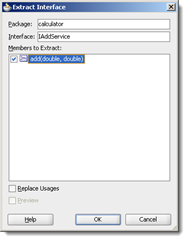
8. “Refactor” the Add Service Interface
clip_image013

9. Name the interface “IAddService” on the “calculator” package
clip_image014

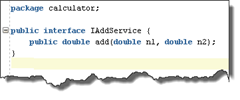
Result: IAddService interface
clip_image015

Note: We also could first implement the interface and afterwards the implementation of this interface, but this way is a shortcut on this example.

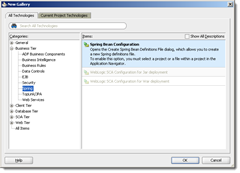
10. Create a Spring Bean Configuration starting from the JDeveloper Technology Gallery
clip_image016

11. Name the Spring Bean Definition file “AddServiceBeanDef.xml”
clip_image017

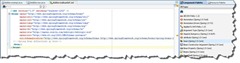
12. Add a “bean” element by selecting “bean (Spring 2.5 Core)” from the Component Palette (place the cursor behind the comment)
clip_image019

13. Add the name attribute “AddServiceBean” and class attribute “calculator.AddServiceImpl” on the bean element
clip_image020

14. Add a “Service” element by selecting “Service (WebLogic SCA)” from the Component Palette. On the upcoming pop-up window add “AddService” as name, “AddServiceBean” as target and “calculator.IAddService” as type. The target name has to match the bean name.
clip_image022

clip_image023

Note: You may have to compile the Java classes. Take care that the SCA Service target attribute is matching the Bean name attribute.

15. Drag and Drop the “Spring Context” from the Component Palette on the Composite Component section
clip_image025

16. Name the Component “AddServiceComponent” and select the “Use Existing Context” option and start the SOA Resource Brower with the magnifying glass icon
clip_image026

17. Select “AddServiceBeanDef.xml” on the SOA Resource Browser (starts with the magnifying glass icon on step 16)
clip_image027

18. Accept the “src/META-INF/AddServiceBeanDef.xml” Spring Bean Context path on the “Use Existing Context” field
clip_image028

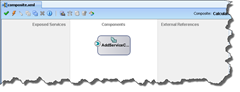
Afterwards the AddServiceComponent is placed on the SCA Composite
clip_image029

Additionally a <Spring Bean Component Name>.componentType file is created automatically on the SOA Content folder. This file keeps the exposed interface information (and the references on other services when the component is wired to other SCA Components).

clip_image030
19. Repeat step 4 to 19 for the SubtractService, MultiplyService and DivideService!

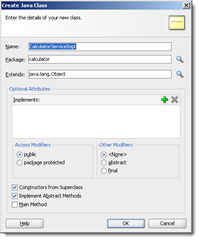
20. Let’s take a look at the Calculator Service Component. This component will call the other arithmetic Service Components. Create a Java class “CalculatorServiceImpl” on the “calculator” Package
clip_image031

21. Add private service variables (use the interface classes for the declaration), create the setter methods and create service methods for the basic arithmetic operations by using the existing arithmetic services.
clip_image032

Note: Like the shown add method you have to implement the subtract, multify and divide methods by using the right service.

22. “Refactor” the Calculator Service Interface and name the interface “ICalculatorService”. Select the basic arithmetic operations as class members to extract.
clip_image033

23. Create a Spring Bean Definition “CalculatorServiceBeanDef”
clip_image034
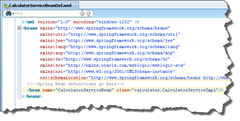
24. Set the bean name “CalculatorServiceBean” attribute and class “calculator.CalculatorServiceImpl” attribute
clip_image035

25. Add the Calculator Spring Context on the Composite Component section
clip_image036

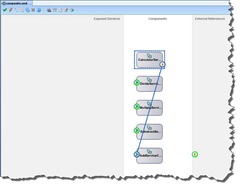
26. Next step is to “wire” the existing Spring Bean Components. Drag and Drop a wire from the CalculatorServiceComponent to the other Spring Bean Components.
clip_image038

Afterwards all the arithmetic SCA Components are wired to the CalculatorServiceComponent. This graphical wiring will add appropriate <sca:reference> elements on the Calculator Bean context definition file.

clip_image039

The new services references have to be injected on the Calculator Bean (“setter DI”). Therefore you have to add standard Spring property elements on the bean declaration within the Spring Bean context definition. These property elements causing a call on the setter operations on the CalculatorServiceImpl class. The bean property ref names have to match the right reference name.

clip_image040

Note: When you missed the <sca:service> tags before you create the Spring Bean Components and you try to wire the beans you will see this error …

clip_image041

This error occurs because the automatic created <Spring Bean Component Name>.componentType files are missing the interface service information. So you have to add the missing service elements manually or you have to delete and re-create the SCA Components (don’t delete the Bean Definition File, the wizard is asking for it!).
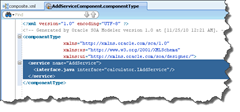
clip_image042

Another common error is the missing property declaration on the bean which should use other services (“missing setter DI”). This result in a nice NullPointerException during the first test (java.lang.Exception: oracle.sysman.emSDK.webservices.wsdlapi.SoapTestException: oracle.fabric.common.FabricException: Invocation failed: java.lang.NullPointerException).

27. Next step is to give the Calculator Service Component an exposed service interface. Therefore you have to give the Calculator service a callable interface declaration. You only have to declare an SCA service interface on the Calculator Service Bean definition.
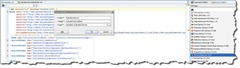
clip_image044

Afterwards you have to add the new service interface also on the CalculatorServiceComponent.componentType file. This declaration makes the Calculator Service Component connectable as public (callable from the SCA outside world) or private (callable from other SCA Components) service.

clip_image045

Note: The service interface configuration gives the components the “green handle”. Only with this handle you are able to connect this component.

28. Now the Calculator service can be exposed as public service. Drag and Drop a wire from the Calculator Service Component to the Exposed Service section.

clip_image047

A pop-up window is asking you what kind of interface you want to create for the service. Because we want to create a Web Service interface and not an EJB interface we press the Web Service button. Btw. you could also have both interface in parallel – Web Service and EJB.

clip_image048

The wizard is creating the necessary mapping between the Java classes and the XML representations. An ICalculatorService.wsdl file is created which offers the basic arithmetic operations of the Calculator Service Component.

clip_image049

The Calculator Service is ready for deployment. Each component has a well-defined interface, using Java interfaces in the case of the calculator example. Notice that these are just plain Java services configured as Spring Beans with business logic and nothing else inside the Java classes (no extend on pre-specified classes, no implement on pre-specified interfaces, no pre-specified annotations, etc.).

clip_image050

This screenshot looks very similar to the diagram on the Tuscany guidelines.

image

29. A quick test could happen with the Test Web Service Client of the Oracle Enterprise Manager. But first you have to create the deployment unit (one JAR file) and deploy the SCA Composite on the SOA Server. My personal favorite Web Service Test Client is the Open Source soapUI tool. Therefore you have to copy the WSDL URL from the Test Web Service client.

clip_image053

Start soapUI and create a new soapUI project. Paste the WSDL on the new project.

clip_image054

Start your tests …

The source code is available as 7-zip here.

That's it.